· df · 2 min read
Clone multiple VM's and create multiple VM's using vagrant
Vagrant is an excellent tool for automation and doing proof of concepts (POC's). In many of the POC's you might need cluster and vagrant can do the clustering in matter of minutes by cloning an existing VM and then making into multiple Virtual machines

Assumption
Let's see the overall Summary of what we are doing to do
Assumption
- You have basic idea of Linux & vagrant
- we are going to use centos/7 for vagrant guest
- The host is Fedora25/Redhat/CentOs system. Can be easily done for ubuntu as well
Let's see the overall Summary of what we are doing to do
- create a working directory
- download and install virtualbox, then vagrant
- clean-up any unwanted boxes you have.
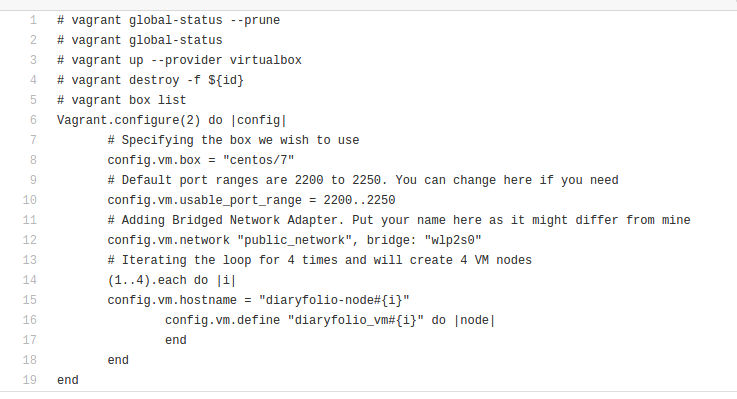
- putting the config file and provisioning
- Validating the nodes
Creating a working Directory
sudo su -
mkdir /opt/vagrantOps
cd /opt/vagrantOps
Download and Install vbox, vagrant to your host (Fedora 25)
vi /etc/yum.repos.d/virtualbox.repo # with contents as per Virtualbox recommendation
dnf install VirtualBox-5.1 # This will install vbox from above repo
dnf install vagrant # Vagrant core
dnf install -y vagrant vagrant-libvirt libvirt-devel # Addons to vagrant
clean-up and purge (if you want to start from scratch)
vagrant box list # to check list of boxes available
vagrant global-status # Will show all running and available VM's
vagrant destroy -f ${id} # Note the id from above command and destroy them
putting the config file and provision
vagrant init # Ensure you are in vagrantOps directory and will create Vagrantfile
# Copy code from github repo and paste it to Vagrantfile
# The config file will provision 4 VM nodes with sample node names
Validating the nodes
vagrant global-status # Will show all running and available VM's
vagrant ssh diaryfolio_vm1 # name of the VM1
vagrant ssh diaryfolio_vm2 # name of the VM2