· df · 2 min read
Certification authority and applying certificate to your domain
Generating a Certificate Signing Request and applying the certificate is very frequent. Some companies require 2048 bit signatures. The following steps will create certificates with 2048 bit and later apply to relevant httpd (apache) server.
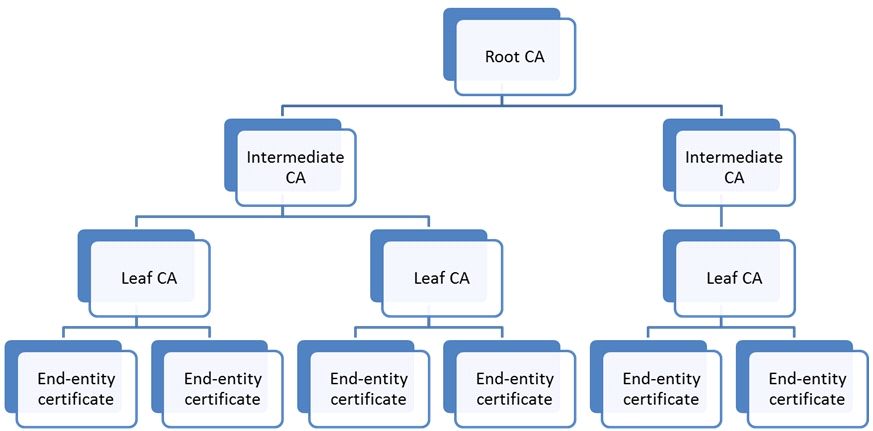 |
| Certificate Hierarchy |
Creating a CSR
Values
Country Name (2 letter code) [AU]:GB
State or Province Name (full name) [Some-State]:London
Locality Name (eg, city) []:Croydon
Organization Name (eg, company) [Internet Widgits Pty Ltd]:My company
Organizational Unit Name (eg, section) []:diaryfolio.com
Common Name (eg, YOUR name) []:subdomain.diaryfolio.com
Email Address []:
Things to remember
- In most cases, ensure "Email address is left blank". But consult your certificate signing authority on this.
- Ensure "Common Name" matches exactly the "ServerName" specified in your httpd.conf (or httpd/conf/extra/httpd-ssl.conf)
Actual Creation
Below creates CSR with 2048 bit# CSR Key generation # Generate a new private key and a new csr, using the default bit length. openssl req -new -keyout <NEWKEYFILE> -out <NEWCSRFILE>Generate a new rsa 2048 key and a new CSR, using a bit length of 1024 (or other specified length).
openssl req -newkey rsa:2048 -keyout <NEWKEYFILE> -out <NEWCSRFILE>
Generate a CSR based on an existing key, you’ll need to know the key’s passphrase. The CSR bit length is the same as the key that was used to create it.
openssl req -out <NEWCSRFILE> -key <PROVKEYFILE> -new
Check a private key bit length, you’ll need to know the key’s passphrase.
openssl rsa -in 2048.key -text -noout
Check a CSR bit length.
openssl req -in <CSRFILENAME> -text -noout | grep bit
Once you receive the .csr or .crt file from the authority, you need to apply this to your web-application.
openssl, all the subcommands are listed and linked to from this man page.
https://www.openssl.org/docs/apps/openssl.html

subcommand "req" help: https://www.openssl.org/docs/apps/req.html#

subcommand "genrsa" help: https://www.openssl.org/docs/apps/genrsa.html#

subcommand "rsa" help: https://www.openssl.org/docs/apps/rsa.html#
Also remember to apply this to your java keystore if you are using Tomcat
#####   Suppose your java location is : /usr/java6_64/
certificateFile="<your_certificate_Location>"
certificateElias="<yourCertificateAlias>"
sudo su - -c /usr/java6_64/bin/keytool -import -trustcacerts -file ${certificateFile} -keystore /usr/java6_64/jre/lib/security/cacerts -alias ${certificateElias}
If you find any Errors, do check my previous post
OpenSSL Examples
A great document is kept here
View certificates details
openssl x509 -in filename.crt -noout -text