· df · 4 min read
Create your own Passport Photo using GIMP
This tutorial is for semi-techies who knows a bit of GIMP (image editing). This tutorial is for UK style passport photo (45mm x 35 mm) which is widely used in UK, Australia, New Zealand, India etc. This is a quick and easy process and one can create Passport photos at home
If you are non-technical, use this link . If you want to create United States (USA) Passport photo or Overseas Citizen of India (OCI) photo, please follow this link
If you are non-technical, use this link . If you want to create United States (USA) Passport photo or Overseas Citizen of India (OCI) photo, please follow this link
How to Make your own Passport Photo - Prerequisite
- GIMP - One of the best image editing tools and its completely Free
- USB stick or any memory device to store and take to nearby shop
- A quality Digital camera
- Local Shops where you can print. Normally it costs (£0.15 or 25 US cents) to print 8 photos
Steps (Video Tutorial attached blow of this page)
- Ask one of your colleague to take a photo of you with a light background. Further details of how to take a photo yourself
-

- Take multiple pictures so that you can choose from the best
- A sample Photo shown below. Ensure that you have sufficient space above your head and your shoulders are clearly visible.
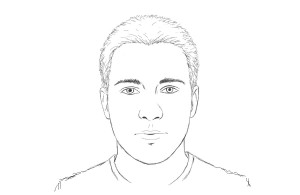
- I assume the photo you selected is a high quality image. DO NOT reduce the quality/pixels of the original image. Right click on the image and open with GIMP. (Hope you installed gimp into your machine)
- From your gimp "Toolbox", click the "Rectangular Select" tool. (Ensure that the "Fixed Aspect Ratio" is unticked). Draw a small rectangle surrounding your face. In the left hand-pane, choose Size, Enter width=350 px and height=450 px. (or a ratio of this) and then select "Fixed Aspect Ratio". You will see a rectangle area in the image to be adjusted accordingly. (Please recheck the Aspect ratio is 350 x 450 as sometimes, GIMP will reset it)
- Using mouse select a rectangle. Ensure it includes the hair, but fill approx 75% with the face. Feel free to increase your selection area if the image is big, as long as the aspect ratio is 350 x 450.
- Now Crop the image and should look like below. from GIMP Menu Image -> Crop to Selection .
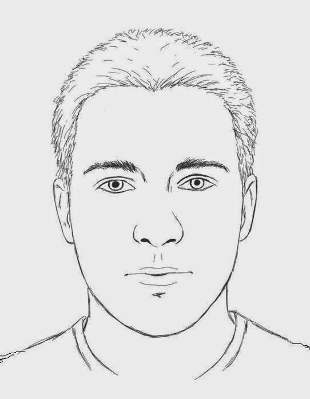
- Now we will resize the image. From GIMP menu, Image -> Scale Image and select width=750 px. The height should become 964 px. If its not becoming 964, something went wrong. Start again
- Open a new GIMP window (File -> New), and specify width = 814 px, height = 1092 px, and specify "fill with background" as below .
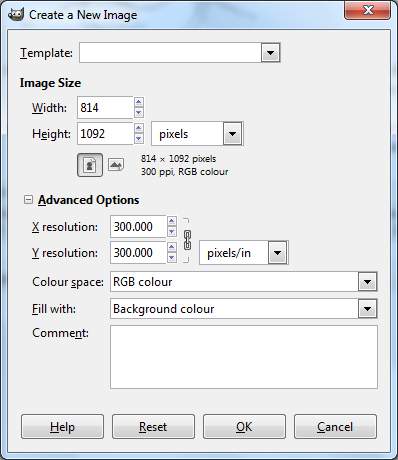
- This will ensure correct margins are left for the image before duplicating them. Copy (Control-C) and paste(Control-V) into new window. Click on the "white" border surrounding your photo, so that all layers are merged.
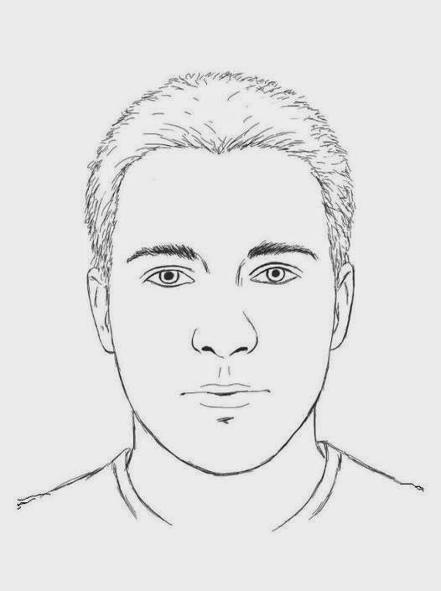
- Now click on the white border. Then Select Filters ->Map -> Tile from GIMP window. "Tile to new size", then disconnect the chain symbol (by clicking on it) and set the width = 3256 px & height = 2184 px
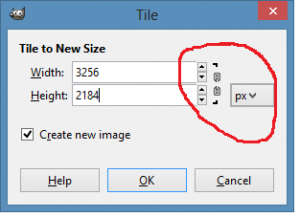
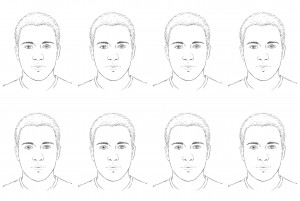
- Ensure the "Create New Image" box is ticked. Result should have 8 photos (as shown below)
- Save the result as a new file with jpg extension, and with no-compression i.e. set to 100%. Please ensure no compression is done for quality photos. (In newer GIMP2, you can do "File -> Export To ", then save it as with jpg extension with "passportTile.jpg")
- Save the .jpg file to a memory stick.
- My local "BOOTS" shop allows USB memory stick, SD card, CD and many other storage to be used . Select 6x4 inch prints, which should print 8 photos. (Select no margins at boots) or Alternatively you could print from your home printer: From GIMP Image -> Print-size , width = 6 inches, height = 4 inches. Then print with File ->Print
Local Shops
You can print nearby local shops or at home. Print a single 6"x4" without border to get 8 passport photos !! The list of local shops are pretty much unlimited, but some of with automated printing machines include
- UK - Boots - 6x4" costs 25p only
- UK - Jessops - 5p !!
- US - Walmart - 9cents
- Canada - Walmart - $0.19
- India - Local Shop: Ask for a Single 6x4" photo - 15 Rs
- Australia - kmart - 15c
The list is pretty endless, but hope it helps you
Experienced Users
Just the values only if you are repeating the process- UK Passport Photo Aspect Ratio: width = 350 px, height = 450 px. - Scale to 750px wide. - New window: width = 814 px, height = 1092 px. - Tile to: width = 3256 px, height = 2184 px.